What is load balancing?
Load Balancer: servers that forward traffic to multiple servers(e.g. EC2 instances) downstream
Load Balancer를 사용하는 이유
- 여러 downstream instance들에 부하를 분산해준다
- 내 application에 대한 single point of access (DNS)를 드러내준다
- downstream instance들의 고장을 원할하게 처리해준다 (load balancer가 health check mechanism으로 어떤 instance로 traffic을 보낼 수 없는지 확인해줌)
- instance들에 대한 regular health check를 해준다
- 내 website에 SSL termination (HTTPS)를 제공해준다
- 쿠키를 사용해서 stickiness를 강화해준다
- High availability across zones (고가용성)
- public traffic과 private traffic을 분리해준다
Elastic Load Balancer -> managed load balancer
- AWS guarantees that it will be working
takes care of upgrades, maintenance, high availability
provides only a few configuration knobs (load balancer의 작동 방식을 수정할 수 있음)
- It is integrated with many AWS offerings / services (다른 많은 AWS 서비스들과 결합 가능)
Load Balancer의 종류
- Classic Load Balancer (v1 - old generation) - 2009 - CLB
: HTTP, HTTPS, TCP, SSL (secure TCP) - Application Load Balancer (v2 - new generation) - 2016 - ALB
: HTTP, HTTPS, WebSocket - Network Load Balancer (v2 - new generation) - 2017 - NLB
: TCP, TLS (secure TCP), UDP - Gateway Load Balancer - 2020 - GWLB
: Operates at layer 3 (Network layer) - IP Protocol
[※ Load Balancer들은 internal (private) 혹은 external (public) ELB로 구현할 수 있다]
◆ Classic Load Balancers (v1)
- Supports TCP (Layer 4), HTTP & HTTPS (Layer 7)
- Health checkes are TCP or HTTP based
- Fixed hostname: xxx.region.elb.amazonaws.com
◆ Application Load Balancers (v2)
- Application load balancer is Layer 7 (HTTP)
- Load balancing to multiple HTTP applications across machines (target groups)
- Load balancing to multiple applications on the same machine (containers)
- Support for HTTP/2 and WebSocket
- Support redirects (ex. from HTTP to HTTPS)
- Routing tables to different target groups: (ALB의 listener rules에서 정의 가능)
routing based on path in URL (example.com/users & example.com/posts)
routing based on hostname in URL (one.example.com & other.example.com)
routing based on Query String, Headers (example.com/users?id=123 & order=false)
- ALBs are a great fit for micro services & container based application (ex. Docker & Amazon ECS)
- Has a port mapping feature to redirect to a dynamic port in ECS


- Target Groups: EC2 인스턴스 (Auto Scaling Group으로 관리할 수 있음) - HTTP, EC2 tasks (ECS에 의해 관리됨) - HTTP, Lambda functions - HTTP request is translated into a JSON event, IP Addresses - must be private IPs 를 target group으로 만들 수 있다
- ALB can route to multiple target groups
- Health checks are at the target group level
- Fixed hostname (xxx.region.elb.amazonaws.com)
- 애플리케이션 서버는 클라이언트의 IP를 직접적으로 볼 수 없다 (클라이언트의 실제 IP는 X-Forwarded-For이라는 헤더에 삽입되어있다. Port는 X-Forwarded-Port, proto는 X-Forwarded-Proto로부터 알 수 있다)
◆ Network Load Balancers (v2)
- Network load balancers (Layer 4) allow to:
Forward TCP & UDP traffic to your instances
Handle millions of request per seconds (high performance)
Ultra-low latency
- NLB has one static IP per AZ, and supports assigning Elastic IP (helpful for whitelisting specific IP)
=> 여러 개의 고정 IP를 가진 애플리케이션을 노출시킬 때 유용함 (cf. 1~3개의 IP로만 access할 수 있는 애플리케이션을 만드는 상황에 대한 문제가 나오면 NLB를 옵션으로 고려할 수 있음)
- NLBs are used for extreme performance, TCP or UDP traffic
- Target Groups (NLB): EC2 인스턴스, IP Addresses - must be private IPs, Application Load Balancer, Health Checks support the TCP, HTTP and HTTPS Protocols (cf. NLB를 ALB 앞에 배치하는 경우: NLB 덕분에 고정 IP 주소를 얻을 수 있고, ALB 덕분에 HTTP 유형의 트래픽을 처리하는 규칙을 얻을 수 있음)
◆ Gateway Load Balancer
- Deploy, scale and manage a fleet of 3rd party network virtual appliances in AWS (ex. Firewalls, Intrusion Detection and Prevention Systems, Deep Packet Inspection Systems...)
- Operates at Layer 3 (Network Layer) - IP Packets
- Combines the following functions: 1. Transparent Network Gateway - single entry/exit for all traffic, 2. Load Balancer - distributes traffic to your virtual appliances
- Uses the GENEVE protocol on port 6081
- 애플리케이션으로 이동하기 전에 모든 트래픽을 검사하려고 하는 경우 사용 (GWLB의 기능은 network traffic을 분석하는 것 등)
- Target Groups (GWLB): EC2 인스턴스, IP Addresses - must be private IPs
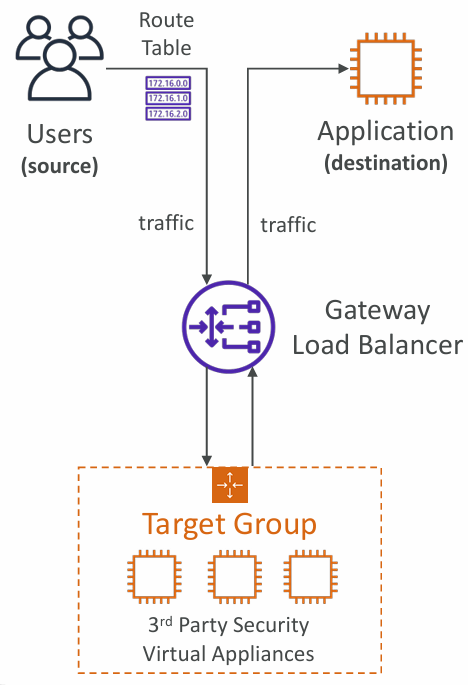
- 위 그림의 flow : 모든 유저 트래픽은 GWLB를 통과함 -> GWLB는 3rd party security virtual appliances들이 있는 target group으로 트래픽을 퍼뜨림 -> 모든 트래픽은 이 virtual appliances들에 도달하고, appliances들은 트래픽을 분석하고 처리함 (ex. firewall, intrusion detection) -> 이상이 없으면 트래픽을 다시 GWLB로 보냄 (이상이 있는 경우 트래픽을 드롭하거나 조치를 취함) -> GWLB에서는 트래픽을 애플리케이션으로 보냄 -> 애플리케이션에서는 모든 트래픽이 GWLB와 3rd party virtual appliances를 통과했기 때문에 트래픽을 분석하고 문제가 있으면 드롭시키는 것을 명확히 할 수 있음
Load Balancer Security Groups
- Load Balancer를 사용하는 경우 Load Balancer에 연결된 EC2 인스턴스는 Load Balancer를 통해 들어오는 트래픽만을 허용해야 한다 (HTTP Restricted to Load Balancer)
- EC2 인스턴스 보안그룹에서 inbound rule의 source를 LB의 보안그룹ID로 설정한다 (EC2 인스턴스의 보안그룹을 LB의 보안그룹으로 연결 => EC2 인스턴스는 LB에서 온 트래픽만을 허용하게 됨)
Sticky Sessions (Session Affinity)
- 동일한 클라이언트가 항상 로드 밸런서 뒤의 동일한 인스턴스로 리디렉션될 수 있도록 하는 stickiness를 구현할 수 있다
- CLB, ALB, NLB에서 사용 가능
- CLB와 ALB의 경우, stickiness에 사용되는 쿠키(cookie)는 사용자가 제어할 수 있는 만료 날짜를 가진다
- Use case: make sure the user doesn't lose his session data
- Stickiness를 활성화하면 백엔드 EC2 인스턴스 간의 부하가 imbalance해질 수 있다
- Cookie names:
* Application-based Cookies - Custom cookie (generated by the target, can include any custom attributes, cookie name must be specified individually for each target group, don't use AWSALB, AWSALBAPP, or AWSALBTG (reserved for use by the ELB), Application cookie (generated by the load balancer, cookie name is AWSALBAPP)
* Duration-based Cookies - Cookie generated by the load balancer, cookie name is AWSALB for ALB, AWSELB for CLB
Cross-Zone Load Balancing

- With Cross Zone Load Balancing: 각각의 ALB는 AZ에 상관없이 받은 트래픽을 10개의 EC2 인스턴스 모두에 전달 => 모든 영역에 있는 EC2 인스턴스에 트래픽이 고르게 분배됨
- Without Cross Zone Load Balancing: 각각의 ALB의 노드 인스턴스로 받은 트래픽을 전달함 => ALB가 자기 영역에 있는 EC2 인스턴스에 트래픽을 고르게 분배함 (각 AZ안에서 트래픽이 분산됨, AZ마다 EC2 인스턴스의 개수가 다르다면 특정 AZ에 있는 EC2 인스턴스들에게 좀 더 많은 트래픽이 할당될 수 있음)
- Application Load Balancer - Enabled by default (can be disabled at the Target Group level), No charges for inter AZ data
- Network Load Balancer & Gateway Load Balancer - Disabled by default, You pay charges for inter AZ data if enabled
- Classic Load Balancer - Disabled by default, No charges for inter AZ data if enabled
SSL/TLS
- SSL Certificate은 클라이언트와 로드 밸런서 간의 트래픽을 암호화하여 전송 중 데이터 보호 (in-flight encryption)를 가능하게 한다
- SSL(Secure Sockets Layer)은 connection들을 암호화 하는데 사용
- TLS(Transport Layer Security)는 SSL의 최신버전
- Public SSL certificates는 Certificate Authorities (CA)에서 발급된다 (public SSL certificate을 로드 밸런서에 추가하면 클라이언트와 로드밸런서의 connection을 암호화할 수 있음) (CA ex. Comodo, Symantec, GoDaddy, etc..)
- SSL certificates는 설정 가능한 만료일이 있으며, 만료 전에 갱신해야 한다

SSL - Server Name Indication (SNI)
- SNI solves the problem of loading multiple SSL certificates onto one web server (to serve multiple websites)
- It requires the client to indicate the hostname of the target server in the initial SSL handshake => 클라이언트가 접속할 웹사이트의 hostname을 말하면 서버에서는 어떤 certificate을 로드해야 하는지 알 수 있음
- The server will then find the correct certificate, or return the default one
- Only works for ALB & NLB, CloudFront, Does not work for CLB (older generation)

- ALB는 correct SSL certificate을 로드해 가져와서 트래픽을 암호화한 다음, (hostname을 확인해서)rule에 따라 www.mycorp.com의 target group으로 요청을 redirect함
- Using SNI, we are able to have multiple target groups for different websites using different SSL certificates
Connection Draining
- CLB: Connection Draining, ALB & NLB: Deregristration Delay
- 인스턴스가 de-registering되거나 unhealthy 상태일 때, "in-flight requests"를 완료할 시간을 제공한다
- de-registering중인 EC2 인스턴스로 새로운 requests를 보내는 것을 중단한다
- 설정 가능한 시간은 1 ~ 3600초 사이이며, 기본값은 300초이다
- 값을 0으로 설정해서 비활성화(disabled)할 수 있다
- Set to a low value if your requests are short => this will allow your EC2 instance to be drained fast, and then be taken offline (maybe to be replaced or something)
- 값을 낮게 설정하면 EC2 인스턴스가 빠르게 draining될 것이고, 그 후에 오프라인 상태가 되어 교체 등의 작업을 할 수 있게 된다
- If requests are long, set to a high value. But EC2 인스턴스가 금방 사라지지 않는다 (draining period가 끝날때까지 가디려야 함)

- EC2 인스턴스에 이미 연결된 유저들은 existing connections 및 existing requests를 완료할 수 있는 충분한 draining time (draining period)을 갖게 됨 => 작업이 끝나면 모든 연결이 정지된다
- 새로운 유저가 ELB에 연결하려고 하면 draining state의 EC2 인스턴스가 있으므로 새로운 연결은 다른 EC2 인스턴스와 맺는다
AWS가 제공하는 핵심 서비스중 하나인 Load Balancer에 대해서 공부했다. 매우 중요한 내용들이고 사용방법과 사례들, 다른 서비스들과의 연계방식에 충분히 익숙해질 수 있도록 해야겠다.
'AWS > Solutions Architect' 카테고리의 다른 글
| AWS IAM (0) | 2024.11.07 |
|---|