- HTTP vs HTTPS
HTTP (HyperText Transfer Protocol)
- 웹 클라이언트(브라우저)와 웹 서버 간에 텍스트, 이미지, HTML 등을 주고받는 비보안 통신 프로토콜
- A protocol for transmitting hypertext (like HTML) between web clients and servers
- 기본 포트는 80
- Uses port 80 by default
- 암호화되지 않음 -> 'MITM (Man-In-The-Middle)' 공격에 취약
- 민감한 정보 (로그인, 카드번호 등) 전송 시 위험
- 통신 속도는 HTTPS보다 조금 빠름
- No encryption -> vulnerable to 'MITM (Man-In-The-Middle)' attacks
- Not safe for transmitting sensitive data
- Slightly faster than HTTPS (due to no encryption overhead)
HTTPS (HTTP Secure)
- HTTP에 TLS/SSL 암호화 계층이 추가된 보안 통신 프로토콜
- A secure version of HTTP that uses TLS/SSL encryption
- 기본 포트는 443
- Uses port 443 by default
- 대칭키 암호화 + 비대칭키로 키 교환 (TLS Handshake 사용)
- 데이터 기밀성, 무결성, 인증성 확보
- 브라우저 주소창에 자물쇠 표시
- Uses asymmetric encryption to exchange a symmetric session key
- Provides confidentiality, integrity, and authentication
- Displays a lock icon in the browser URL bar
- Encryption
Symmetric Encryption (대칭키 암호화)
- 같은 키로 데이터를 암호화/복호화 하는 방식 (어떻게 shared key를 exchange할 것인가의 문제가 있음)
- Uses the same key for encryption and decryption (fast and efficient but suffers from key distribution challenges)
- ex) AES, DES
Asymmetric Encryption (비대칭키 암호화)
- 공개키(public key)로 암호화하고 개인키(private key)로 복호화하는 방식, 키 교환 과정에서 사용됨
- Encrypts data using a public key and decrypts with a private key (useful for secure key exchange)
- ex) RSA, ECC
- TLS
- TLS는 대칭키 암호화를 사용하지만, 이 대칭키는 비대칭키 기반으로 교환됨
- TLS uses symmetric encryption for efficiency, but the session key is securely exchanged using asymmetric encryption
- 먼저 클라이언트는 서버의 공개키로 세션키를 암호화해서 전송하고, 서버는 이를 복화화하여 이후 통신에서 대칭키를 사용
- The client encrypts a session key with the server's public key, and the server decrypts it to begin symmetric encrypted communication
- TLS Handshake
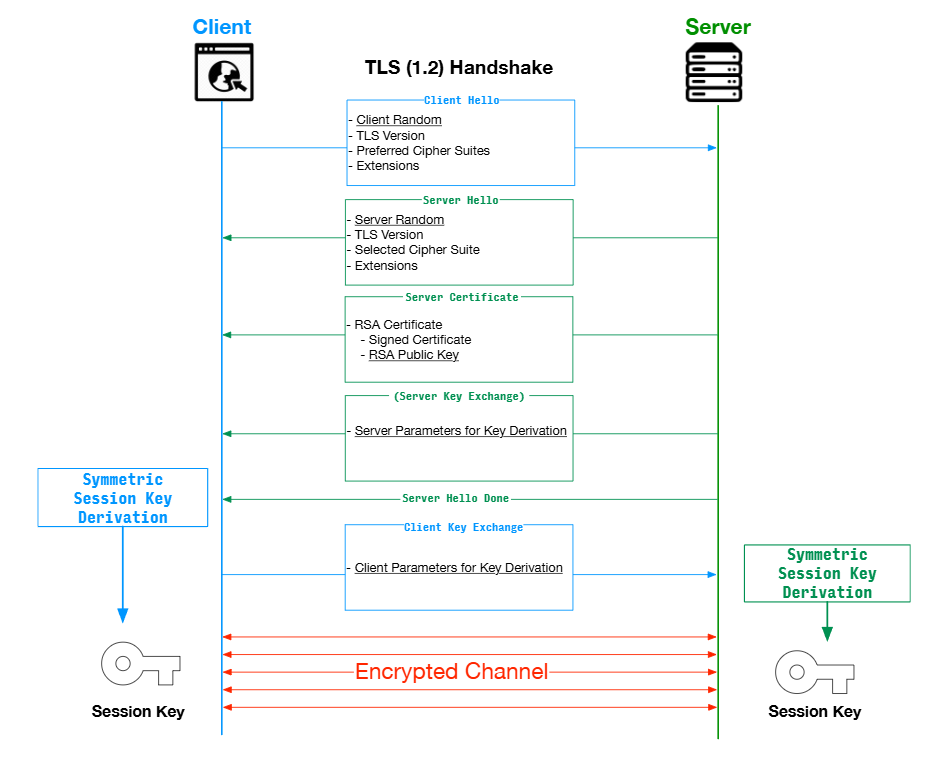
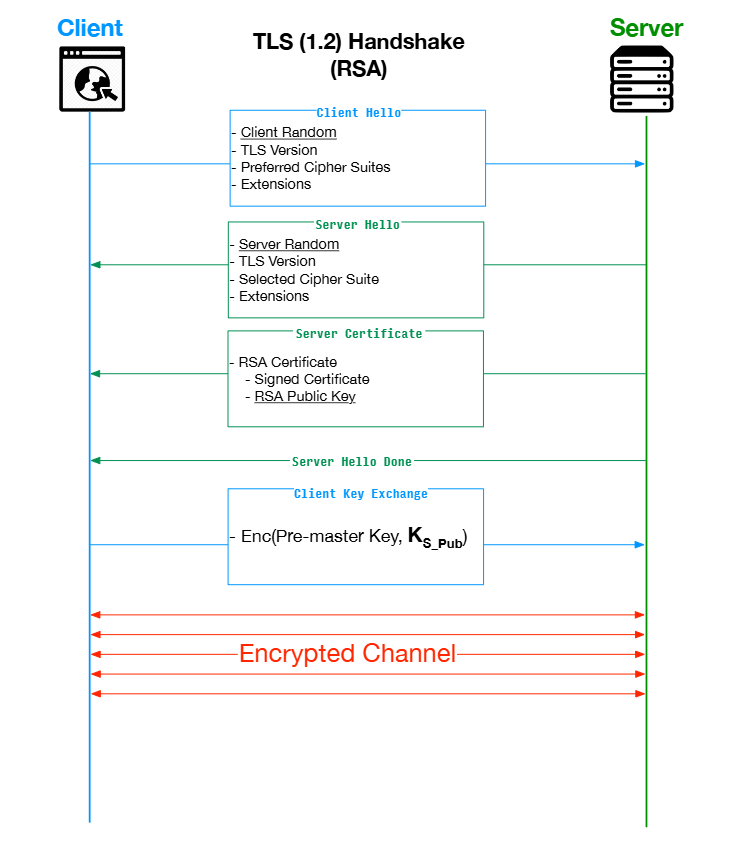
- TLS는 대칭키 기반 통신의 효율성과 비대칭키 기반 키 교환의 보안성을 결합하여 안전하고 빠른 통신을 제공
- TLS provides secure and efficient communication by combining symmetric encryption for speed and asymmetric encryption for secure key exchange
- TLS handshake에서 비대칭키의 역할
- 인증 (Authentication) - 서버의 공개키로 서명된 인증서 제공 -> 클라이언트가 서버 신원을 검증 (RSA, ECC)
- 키 교환 (Key Exchange) - RSA: 공개키(서버)로 세션키 암호화 / ECDHE: 임시 키 쌍으로 공통 키 생성 (RSA, ECDHE)
- 보안성 유지 - 개인키는 서버만 보유 -> MITM 공격 방지
- TLS uses asymmetric encryption primarily during the handshake to authenticate the server and securely exchange the symmetric session key. RSA encrypts the session key with the server’s public key, while Diffie-Hellman calculates the key jointly using ephemeral key pairs, providing forward secrecy
- TCP vs UDP
TCP (Transmission Control Protocol)
- 연결 지향형 (connection-oriented) 프로토콜
- 데이터 전송 전 3-way handshake를 통해 연결을 설정
- 데이터가 순서대로 전달되며 재전송, 흐름 제어, 혼잡 제어 기능이 포함되어 신뢰성이 높음
- A connection-oriented protocol
- Establishes a connection using a 3-way handshake before transmitting data
- Ensures reliable delivery, correct order, retransmission, and flow/congestion control
- Relibale (retransmits lost packets), Ordered delivery, Requires connection (3-way handshake), Slower than UDP
- ex) web browsing (HTTP/HTTPS), email (SMTP, IMAP), file transfer (FTP)
UDP (User Datagram Protocol)
- 비연결형 (connectionless) 프로토콜
- handshake없이 데이터를 바로 전송
- 전송 성공 여부나 순서를 확인하지 않기 때문에 신뢰성이 낮음
- A connectionless protocol
- Sends data without establishing a connection
- No guarantee of delivery or order, but offers low latency and fast transmission
- No guarantee (can lose data), Unordered, No handshake, Fast and low latency
- ex) video streaming, real-time game, VoIP (Voice over Internet Protocol)
Q) What is the difference between TCP and UDP?
A) TCP is a connection-oriented protocol that guarantees reliable and ordered delivery through mechanisms like retransmission and flow control. It's used for applications that require accuracy, like HTTP or email.
UDP is connectionless and does not ensure delivery, making it faster and suitable for real-time services like video streaming and gaming.
- TCP 3-way handshake: 신뢰성 있는 양방향 통신을 위해 연결을 설정하는 절차, 클라이언트와 서버가 연결 가능 여부와 초기 시퀀스 번호를 교환하며 서로의 상태를 확인
- 3 step process
- SYN (client -> server): 클라이언트가 연결을 요청하며, 자신의 초기 시퀀스 번호를 포함한 SYN 패킷을 전송 (client sends a SYN packet to initiate a connection) / SYNbit = 1, Seq = x
- SYN-ACK (server -> client): 서버가 연결을 수락하며, 자신의 초기 시퀀스 번호와 함께 SYN + ACK 패킷을 전송, 클라이언트의 SYN에 대한 확인 응답도 포함 (server replies with SYN-ACK to acknowledge the client's request and send its own) / SYNbit = 1, Seq = y, ACKbit = 1, ACKnum = x+1
- ACK (client -> server): 클라이언트가 서버의 응답을 수신하고, ACK 패킷을 보내 연결을 완료함 (client sends a final ACK, and the connection is established) / ACKbit = 1, ACKnum = y+1
- 3-way handshake가 필요한 이유: 양측의 수신 준비 상태 확인 (양방향 연결 확인), 시퀀스 번호 동기화 -> 데이터 순서 보장, 통신 신뢰성 확보 (패킷 손실/ 재전송 대비)
Q) Can you explain how the TCP 3-way handshake works?
A) It’s a three-step process to establish a reliable TCP connection. First, the client sends a SYN packet to initiate the connection. The server responds with a SYN-ACK packet acknowledging the request. Finally, the client replies with an ACK, completing the handshake. This ensures both parties are ready to communicate and synchronizes their sequence numbers.
- OSI 7 layer
OSI Model (Open Systems Interconnection Model)
- 네트워크 통신 기능을 7개의 계층으로 나누는 개념적 프레임워크
- A conceptual model that divides network communication into 7 layers, where each layer has a specific role and interacts with adjacent layers

7. Application Layer
- 사용자와 가장 가까운 계층, 이메일, 웹 브라우징 등
- Closest to the user, handles services like email, web browsing
- ex) HTTP, FTP, SMTP, DNS
6. Presentation Layer
- 데이터 형식 변환 (인코딩, 압축, 암호화)
- Data translation (encoding, compression, encryption)
- ex) SSL/TLS, JPEG, HTML, JSON
5. Session Layer
- 연결 설정, 유지, 종료 (세션 관리)
- Session management (establish, maintain, terminate)
- ex) NFS, SMB, RPC
4. Transport Layer
- 데이터 신뢰성 보장, 오류/흐름 제어
- Ensures reliable data delivery, error and flow control
- ex) TCP, UDP
3. Network Layer
- IP 주소 부여, 라우팅 처리
- Logical addressing (IP), routing decisions
- ex) IPv4, IPv6, ICMP
2. Data Link Layer
- MAC 주소 사용, 프레임 전송, 오류 검출
- Physical addressing (MAC), framing, error detection
- ex) Ethernet, Switch
1. Physical Layer
- 실제 전기적/물리적 신호 전송
- Transmission of bits as electrical or optical signals
- ex) Cable, Fiber, Hub, Bluetooth, NFC
Q) Can you explain the OSI 7 Layers?
A) The OSI model divides network communication into 7 layers, each with a distinct function. For example, the Application Layer interacts directly with the user, the Transport Layer ensures reliable delivery using TCP/UDP, and the Physical Layer deals with the actual transmission of signals. This model helps standardize and troubleshoot network communications.
Q) Can you give examples of protocols for each OSI layer?
A) For the Session Layer, protocols like SMB and NFS manage file sharing sessions. In the Network Layer, IPv4 and IPv6 provide logical addressing and routing. For the Physical Layer, technologies like Bluetooth and NFC handle the actual transmission of data through electromagnetic signals.
- DNS / DHCP / NAT
DNS (Domain Name System)
- 도메인 이름(예: google.com)을 IP 주소로 변환해 주는 시스템
- 계층적 구조: Root → TLD(Top-Level Domain) → Authoritative
- A system that translates human-readable domain names (e.g., google.com) into IP addresses
- Hierarchical structure: Root → TLD → Authoritative DNS servers
- DNS Query 과정: 브라우저 → DNS Resolver → DNS 서버
DHCP (Dynamic Host Configuration Protocol)
- 네트워크에 접속한 클라이언트에게 IP 주소, 서브넷 마스크, 게이트웨이, DNS 서버 정보를 자동 할당하는 프로토콜
- 수동 설정 없이 자동 구성을 가능하게 함
- IP 충돌 방지, 중앙 관리 가능
- A protocol that automatically assigns IP addresses and configuration info (subnet mask, gateway, DNS) to clients in a network
- Eliminates manual IP configuration, prevents conflicts, and centralizes management
- ex) PC, 스마트폰이 Wi-Fi에 연결될 때 자동으로 IP를 부여받는 과정 / DHCP 서버: 라우터, 네트워크 장비 등
NAT (Network Address Translation)
- private IP를 public IP로 변환해주는 기술
- IPv4 주소 부족 문제를 해결하기 위해 주로 사용
- 내부 네트워크의 보안성을 높이고, 여러 장치가 하나의 public IP를 공유 가능
- A technique that translates private IP addresses to public IP addresses, allowing multiple devices to share a single public IP
- Solves IPv4 address exhaustion issues and enhances internal network security
- ex) 가정에서 여러 기기가 192.168.x.x로 로컬 통신, 외부와 통신할 때는 하나의 공인 IP 사용
Q) Can you explain the differences between DNS, DHCP, and NAT?
A) DNS resolves domain names to IP addresses, making it easier for users to access services. DHCP automatically assigns IP addresses and network settings to devices. NAT translates private IPs to public IPs, allowing multiple devices to share a single public IP and providing security and address efficiency.
- Subnetting / CIDR / IP Routing
- Subnetting: Dividing networks into smaller segments
- CIDR: IP range notation using IP/Prefix
- IP Routing: Determining best path for packet delivery
- Network Troubleshooting Tools
- ping: Checks connectivity
- traceroute: Tracks packet path
- nslookup, dig: DNS queries
- curl: Sends HTTP requests
- nc (netcat): Tests open ports, acts as server/client
'AWS > SA Tech interview (CS)' 카테고리의 다른 글
| Development (0) | 2024.10.30 |
|---|---|
| Cloud service / Virtualization (1) | 2024.10.17 |